
TL;DR
- Most managed IT stacks assume someone can open an inbound port. Many warehouses and carriers will not.
- Self-test from phone LTE this week: if inbound ports vanish tomorrow, what breaks by lunch?
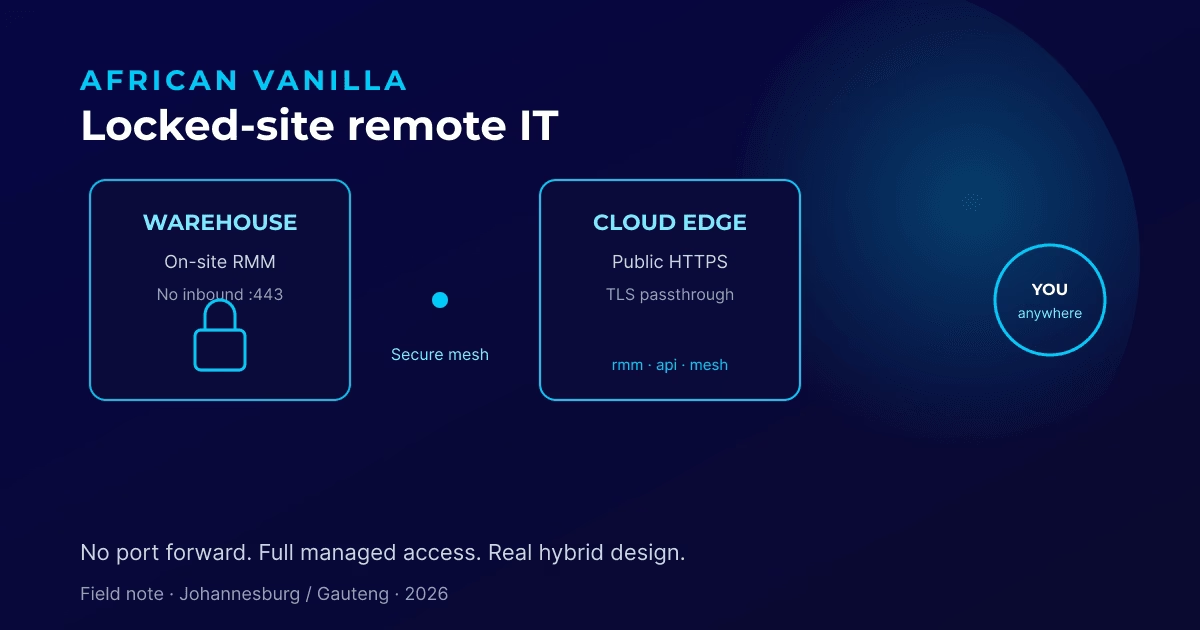
- The pattern that works: small cloud edge (HTTPS) → encrypted identity mesh → on-site control plane, with the warehouse WAN closed.
- Do not bet on the ISP enabling port forward, open RDP with dynamic DNS, or a reverse proxy pointed at an unreachable private IP.
- Book a free IT audit to map public vs mesh-only paths before your next lease move.
Most managed IT sales decks quietly assume one thing: somebody can open a port. HTTPS. RDP. VPN concentrator. “Just port-forward 443 to the server.”
Then you move a warehouse into a building whose carrier will not do inbound NAT. Or the new circuit is CGNAT. Or the landlord’s firewall is locked by policy. Suddenly your remote management stack, the thing that was supposed to keep the site safe and supported, is only reachable if someone is physically on that LAN.
Are you one warehouse or ISP change away from that failure? This guide shows how to find out this week, what not to do, the architecture pattern that survives locked sites, and how we package the outcome for Gauteng businesses.
What failure mode do owners actually feel?
Internally healthy and externally dead. That is the combination that hurts.
Before a move (or a carrier change):
- Monitoring and remote admin work from home, phone LTE, and the office.
- Agents check in. After-hours tickets get handled.
- Life feels fine until the building changes underneath you.
After:
- Everything still works on the LAN.
- From outside, browsers die at TLS, remote admin is unreachable, agents go quiet or flaky.
- The instinctive fix (“open 443 on the firewall”) is off the table.
Perfect storm for finger-pointing between ISP, firewall vendor, DNS host, and “the software.” Meanwhile your team is flying blind after hours.
How do you test your own business this week?
From a phone on LTE (not Wi-Fi):
- Open your remote admin / monitoring / VPN portal.
- Try a remote desktop or remote-control session through your provider’s path.
- Ask your IT partner: “If the ISP tomorrow forbids all inbound ports, what breaks by lunch?”
If the honest answer is “everything college-laptop RDP-shaped,” you do not have a resilient design. You have a temporary lucky network. Fix that before the lease move, not during it.
What does not work for locked sites?
We see the same dead ends repeatedly:
- Hoping the carrier will “just enable port forward.” Sometimes yes. Often no: enterprise LTE, MPLS handoffs, shared buildings, CGNAT.
- Exposing RDP or the on-site admin box with a dynamic DNS and a hope. Insecure, fragile, fails POPIA smell tests.
- Moving the entire control plane only to a SaaS you cannot exit. Fine for some SMEs. Wrong for manufacturers who need on-site agents, local remote control, and data residency they understand.
- Random reverse proxies pointed at private IPs with no mesh path. Spend days debugging “502” when the origin was never reachable from the cloud.
What architecture works when the WAN stays closed?
The pattern we implement looks like this in plain language:
Internet → small cloud edge (HTTPS)
        → encrypted identity mesh tunnel
        → on-site monitoring / remote control plane (no inbound WAN holes)
What that means for the business:
- Origin stays on-site. Dashboard, agent API, and remote control keep living where your machines live.
- Public DNS points at a small cloud edge, not at the warehouse WAN.
- The edge does TLS passthrough into the mesh toward the on-site peer. It does not fake a broken path with a random cloud certificate.
- Warehouse WAN stays closed. No inbound DNAT. No RDP to the world.
Result: admin from any network (home, phone LTE, office), agents check into the same familiar public hostnames, remote control still available, and staff already on the overlay keep using their internal path.
You sell the outcome as Secure Remote Access for locked-down sites, not as “we installed product X.”
How do you implement it in six steps?
Use this as a whiteboard checklist before or after a site move:
- Map public vs mesh-only. List every admin URL, agent check-in host, and remote-control path. Mark which must work from the public internet vs which stay on the overlay only.
- Point public DNS at the edge, not the warehouse. If the carrier cannot accept inbound traffic, the warehouse must never be the public target.
- Prove the origin is healthy on the mesh first. If it fails on the overlay, fix that before touching the public edge. Internally healthy, externally dead is a different problem from “origin is down.”
- Put a true TLS-passthrough edge in front. Many reverse proxies terminate HTTPS and then try to re-encrypt. For this design you need the outer edge to hand raw TLS through to the mesh path. A normal HTTP terminator on 443 will never complete the pattern.
- Validate from LTE. Dashboard loads. Agent API answers. Remote session works. Certificates on those public names should still reflect the origin: proof of passthrough, not a disguised dead end.
- Document and hand over. Architecture note, DNS cutover plan, who owns renewal, and a one-page “if inbound ports vanish” runbook. Root cause written down, not just “restarted it.”
AI-assisted hop-by-hop checks can shorten time-to-root-cause on live systems. Humans still own every risky change window.
What did a live Gauteng recovery look like?
We recently recovered a multi-site Gauteng environment after a warehouse move where the new carrier would not open inbound HTTPS. Internal access was fine. Public admin and agent paths were dead.
The fix was not shouting at the ISP. It was the hybrid pattern above: small cloud edge → encrypted mesh → on-site control plane, warehouse WAN closed. After correcting the outer edge to true TLS passthrough and re-testing from the public internet, dashboard, agent API, and remote control were healthy again, with no inbound holes on the warehouse.
That is the continuity promise we make when buildings change underneath a managed site.
What should Johannesburg and Gauteng businesses demand?
| Question | Answer you should demand |
|---|---|
| What happens if we move warehouse / change ISP? | A written remote-access design that does not depend on inbound NAT |
| Is our management plane exposed on the open internet? | Prefer mesh + limited edge over open RDP or open admin boxes |
| Can you prove external health without visiting site? | Live checks on admin + agent URL + remote control from LTE |
| Do you document root cause, not just “restarted it”? | Architecture note + status timeline (we do) |
| Will AI “run our IT” unsupervised? | No. AI accelerates diagnosis; humans own risk and change windows |
How do we package locked-site continuity?
We sell the pattern under language clients already understand:
-
Secure Remote Access for locked-down sites
Mesh overlay + public TLS edge + on-site monitoring / remote control retained. Built for warehouses, factories, and branch offices on stubborn carriers. -
Site-move IT continuity project
Pre-move check of remote paths, DNS cutover plan, edge validation, agent URL verification. -
Managed monitoring retainers
Month-to-month transparency, local Gauteng support, remote management that survives network politics. See our Partner Programme tiers or model a stack on the services calculator.
If you already take managed services from us, this is how we keep our promises when buildings change underneath you.
What security notes matter without the scare theatre?
Closing inbound HTTPS on the warehouse reduces random internet scanning of your admin plane. You still need solid identity on the mesh, least privilege, MFA on admin, patching, and backups.
TLS passthrough means your origin certificates remain the source of truth. Plan renewal the way you always should. Keep the cloud edge lean. It is a door, not a petting zoo of containers.
What should you do next?
Book a free IT audit before your next lease move if you run manufacturing, logistics, multi-branch retail, or any site behind a carrier that laughs at port forwards.
Book your free IT audit. We will map:
- What is public vs mesh-only today
- What dies if inbound ports disappear
- A fixed-cost path to keep remote IT alive
International operators: see our USD locked-site continuity package.
No lock-in pitch. No mystery change window. Just a design you can diagram on a whiteboard.
Guide distilled from a live African Vanilla continuity recovery in July 2026: architecture first, hop-by-hop evidence, human approval on every risky change.